

Dear Rachel,
I think I finally hate my CRM. It has taken me three years to admit it, but there it is. Between the clunky workflows, the invoices I can never find, and the two other tools I’ve bolted on just to make it function, I dread opening the thing every morning.
Here’s my problem. It’s June. I have eleven weddings still on the calendar this year, half a dozen contracts that aren’t signed yet, payment plans running for most of my couples, and a portal link I’ve already sent to every single one of them. I want to switch. I really do. But every time I picture actually moving everything over in the middle of my busiest stretch, I get this pit in my stomach. What if I break a payment schedule? What if a client goes to pay and the link is dead? What if I create more chaos than I already have?
Am I stuck with this until January? Or is there a way to do this without setting my whole season on fire?
Signed, Overwhelmed and Mid-Season
Dear Overwhelmed,
First, take a breath. You are not stuck, and you are not about to set anything on fire.
The pit in your stomach comes from a picture you’ve painted in your head, and it’s the wrong picture. You’re imagining that switching means picking up all eleven weddings, all six unsigned contracts, and every active payment plan, and carrying them across to a new home in one giant, terrifying armful. Of course that feels awful. Nobody should do that mid-season, and honestly, nobody should do it that way at all.
Here’s the truth that’s going to make this whole thing feel manageable. Switching your CRM does not mean migrating every active project at once. It rarely should. Let me walk you through how this works.
Why this feels so overwhelming
Let’s name what you’re really up against, because it isn’t just software.
Your active projects are all in different stages. One couple just inquired. Another signed six months ago and has a payment plan halfway done. A third is getting married in three weeks. Moving all of those the same way makes no sense, because they don’t need the same things.
On top of that, your clients already have links, payment schedules, and portals in their hands. That’s the part that scares people most, and fairly so. You don’t want a couple opening a broken link the week before their wedding.
You also have contracts and records you have to keep. Signed agreements, invoices, payment history. Those need to stay safe and accessible no matter what tool you’re using.
And then there’s the plainest reason of all. It’s your busy season. You do not have three uninterrupted days to sit down and rebuild your entire business in a new system. You shouldn’t have to.
So we’re not going to ask you to.
The phased-switch approach
The trick is to stop thinking of this as a migration and start thinking of it as a transition. Same destination, completely different feeling.
Here’s the shape of it.
- Pick a clear transition date. Choose a day, maybe the first of next month, that becomes your line in the sand. Before that date, business happens in your old system. After it, new business starts in Retainly. That single decision removes about ninety percent of the guesswork.
- Leave your active projects where they are when moving them would cause confusion. That signed couple with the payment plan running? They stay put. Their experience is working. Don’t touch it.
- Start every new inquiry and newly booked client in Retainly after your transition date. This is where the switch actually happens. Not in a frantic weekend, but naturally, one new client at a time, as they come in.
- Move a select active project only when there’s a clear benefit and low risk. We’ll talk about which ones qualify in a minute. It’s a short list.
- Don’t recreate documents just to have everything in one place. The urge to make your new system “complete” is strong, and it’s a trap. A signed contract that lives safely in your old system is still a signed contract. You don’t need a duplicate.
You finish the season on your current setup and start the next chapter on the new one. The two systems overlap for a little while, and that’s not a failure. That’s the plan working.
What to prepare before you move anything
Even a phased switch deserves a little groundwork. Spend an afternoon, not a weekend, on this.
Export your client contact information from your current system so you have a clean list of names, emails, and phone numbers.
Download the records you’re legally and practically required to keep. That means signed contracts, invoices, payment records, questionnaires, and any attachments. Save them somewhere organized and backed up, like a clearly labeled folder in your cloud storage. Even after you switch, these are your paper trail.
Make a simple list of your active projects and where each one stands. A quick spreadsheet is plenty. Client name, project, stage, signed or not, paid or not, event date. This becomes your map for deciding what moves and what stays.
Note the templates and workflows you actually reach for most often. You probably have three or four contracts and a couple of email sequences you use constantly. Those are your priorities. The rest can wait.
And confirm what you’re required to retain for legal, tax, or record keeping reasons. When in doubt, keep it. If you’re unsure how long to hold onto signed agreements and payment records, that’s a great question for your accountant, and The Legal Paige has resources on contract record keeping that are worth a look.
A practical order for setting up Retainly
When you’re ready to build your new home, do it in this order. It keeps you from backtracking.
- Set up your business details and branding first, so everything you create afterward already looks like you.
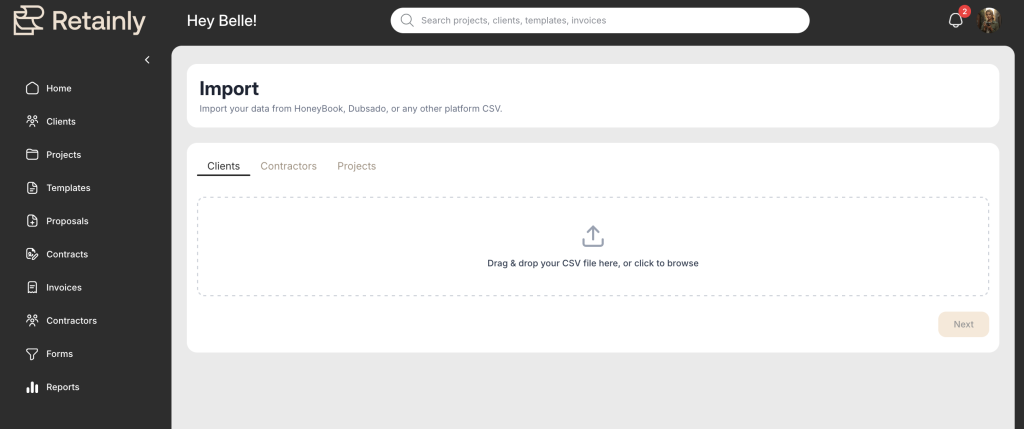
- Add or import your clients (Retainly has a quick and easy CSV import to get your clients and projects loaded in less than 2 minutes!)
- Create your project types.
- Add the contracts and templates you use most.
- Set up your invoice preferences and payment methods.
- Test the whole thing using a personal email address, so you experience it exactly the way a client will.
- Start using Retainly for new business.
That step six, testing with your own email, is the one people skip and later regret. Do it. Send yourself a contract, sign it, pay a test invoice. Ten minutes of playing pretend client saves you later!
Hot tip: Want help getting set up? Ask us about our white glove onboarding experience, where the Retainly team takes care of all this for you!
What your clients need to know
Here’s the part that will settle your stomach the most. Most of your clients don’t need an announcement at all.
Think about it from their side. If a couple already signed, already has their payment plan, and is happily coasting toward their wedding in your old system, nothing about their experience is changing. There’s no reason to send them a “we’re switching software” email that only creates questions where there were none.
The only clients who need a heads-up are the ones who will receive something new from you through Retainly, like a fresh contract or invoice. And even then, it’s a soft, friendly note, not a big production. Something like this:
Hi [Name]! Quick note so it doesn’t surprise you. Your contract and invoice are going to come through a new system. I’ve started using called Retainly, so keep an eye out for an email from [your business name]. If you don’t see it, check your spam folder and let me know. Everything else stays exactly the same. Can’t wait to work with you!
That’s it. A software change on your end does not need to become an event on their end.
When it’s fine to move an active project
Sometimes moving a project mid-stream genuinely makes sense. Here’s the short list of green lights. You want most or all of these to be true before you bother.
- The client hasn’t signed or paid yet, so there’s no live payment plan or executed contract to disrupt.
- Your current system is actively getting in the way of the next step.
- You have enough breathing room to test the new workflow before the client sees it.
- The client can get clear instructions without you having to duplicate any documents.
A brand-new inquiry that hasn’t gone anywhere yet is the easiest possible candidate. Basically, it’s a new client, and new clients belong in Retainly anyway.
When to leave an active project exactly where it is
And here’s the list that will keep you out of trouble. If any of these are true, leave it alone through the end of the project.
- The contract is already signed.
- A payment plan is already underway.
- The event or service date is close.
- Moving it would create duplicate invoices, links, or records.
That last one is the big one. Two invoices for the same balance is how clients get confused and how you get an awkward “wait, which one do I pay?” email at 9pm. If moving a project would put two of anything into the world, don’t move it.
The real goal here
I want to leave you with the thing I wish someone had told me the first time I switched systems.
The goal is not a perfect migration. There’s no prize for having every project you’ve ever booked living tidily in one place. The goal is a cleaner, calmer system for your business going forward, starting with your very next client.
You finish this season on the tool you already have. You start your next season, and every new inquiry between now and then, somewhere better. The overlap is temporary and completely normal. By the time your slow season rolls around, the switch will already be mostly done, quietly, in the background, without a single broken link or panicked couple.
So no, you are not stuck until January. You can start the good part next week! (And we’ll be here to help every step of the way!)
With love, Rachel