

Now You Choose How to Send: Email or Shareable Link
You’ve spent years building a client experience that feels like you. The way you word your emails. The little touches in your welcome process. The rhythm of how you move someone from “I’m interested” to “we’re booked.”
So the way you deliver a contract or invoice should feel like you too. Sometimes that means letting Retainly send a clean, professional email for you. Other times it means dropping a link into the message you were already writing. Now you get to pick, right at the moment you hit send.
Two ways to send, every time
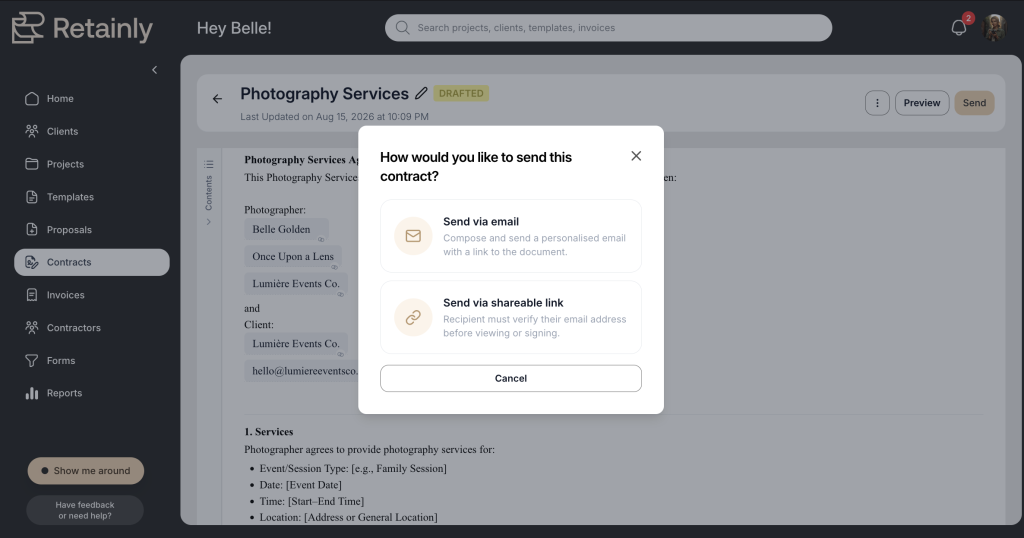
When you send a contract or invoice in Retainly, you’ll see two options.
Send by email, and Retainly delivers it for you the way it always has. Nothing to copy, nothing to paste. It just goes out.
Or send by Shareable Link, and Retainly gives you a direct link you can drop into your own email, a text, or whatever thread you already have going with that client.
Neither one is the “right” way. They’re just there so you can go with whatever feels easier for that client, that day. Some sends are faster through Retainly. Some fit better inside a conversation you’re already having. The choice is yours every single time.
Why we’re excited about the link
The email option has always worked well, and plenty of your sends will keep going out that way. But the Shareable Link opens up all the moments where a plain automated email isn’t quite what you need.
You get to keep the workflow you already like. Maybe you send a warm note before the contract, or you have a specific order you like to do things in. With a link, Retainly handles the contract and the payment piece while you handle the client experience the way you always have. No separate portal for your client to dig through, no extra password just to find a document.
And it fixes one of those small but annoying moments. A client says they can’t find the original email. Instead of resending the whole thing or walking them through their spam folder, you grab the link and paste it into a fresh message. Thirty seconds, handled.
Where the link really shines
For contracts. Share the same link with more than one person who needs access. This is especially handy when two clients are on a project and both need to sign, like a couple booking a wedding or two business partners signing off together. If you’ve already sent a contract but it hasn’t been signed yet, you can add another signer, give them access, and send them the link.
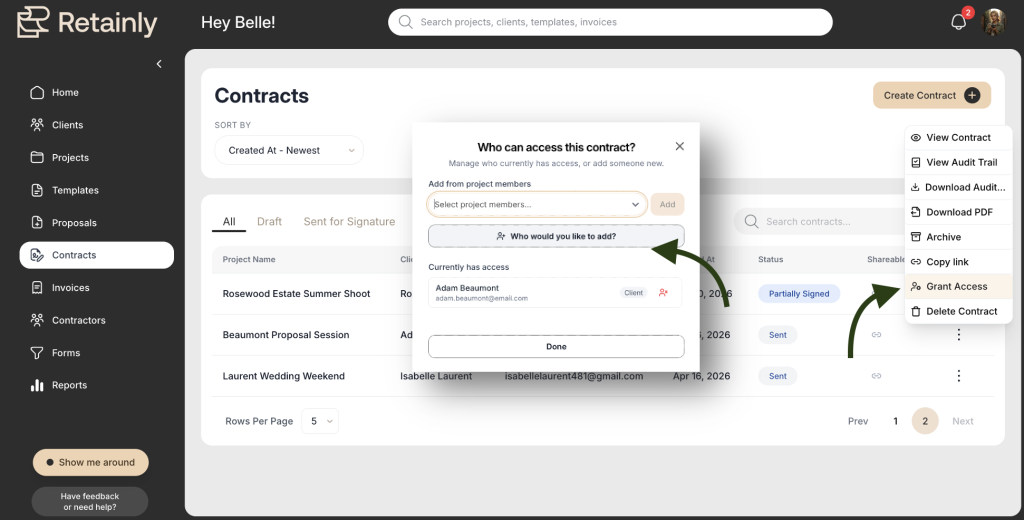
One important note: signing is still tied to each signer’s email, because that’s how Retainly confirms who is actually signing. So even though you’re sending a simple link, the security around the signature stays intact.
For invoices. Say you sent an invoice to one person, but someone else needs to make a payment. Maybe a family member is covering part of the cost, or a second person on the project wants to pay a later installment. Instead of rebuilding the invoice from scratch, you send them the link directly and they can pay from there.
The short version
Every contract and invoice now comes with a choice: let Retainly send the email, or grab a Shareable Link and send it your way. Use whichever feels easier in the moment. We just think you’re going to love having the link in your back pocket for all the times it fits better than a standard email.
It’s live now, so next time you send a document, look for the two options and pick the one that works best!