

Switching CRMs? Your Client List Can Come With You
You finally decide to try a new system for running your business. You have looked at the screenshots, watched the demo, maybe even signed up. And then it hits you. Every client. Every name, email, and phone number you have collected over the years, all of it living in your old tool or buried in a spreadsheet somewhere. The thought of typing all of that in by hand, one client at a time, is enough to make you close the tab and tell yourself you will deal with it later.
If you have ever put off switching tools because rebuilding your client list felt like a second job, you are exactly who we had in mind.
Retainly now supports CSV Import, which is a simple way of saying you can bring your existing client list with you instead of starting over.
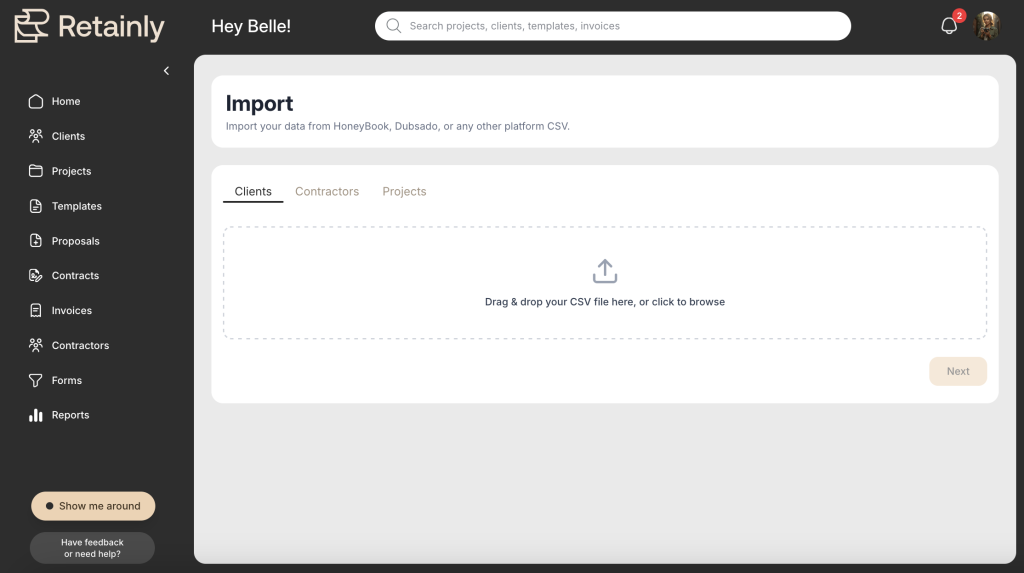
Why it’s a game changer
Here is the short version. If your clients already live somewhere, whether that is another CRM, a Google Sheet, or an exported contact list, you can upload that file and bring those clients into Retainly all at once. No retyping. No copying and pasting names for an hour. You bring the list you already have, and it becomes your client list inside Retainly.
That matters because one of the most common worries we hear sounds something like this: “I already use another platform. Is switching going to be a huge headache?” Rebuilding a client list by hand is usually the scariest part of that switch, especially if you have been in business for a few years and have hundreds of clients to your name. CSV Import is built to take that fear off the table.
And it is not only for clients. You can use the same CSV import to bring in your projects and your contractors too. So if you already track your projects in a spreadsheet, or you keep a running list of the second shooters, assistants, and vendors you work with, those can come over the same way. Same idea, same simple upload, just a different list.
How it works
The process is simple, and you do not need to be technical to get through it. The steps below walk through a client list, but they work exactly the same way whether you are importing clients, projects, or contractors.
- Export your client list from your current system, or open the spreadsheet where you already keep everyone.
- Save or download that file as a CSV. Most tools and spreadsheet apps have a “Save as CSV” or “Export as CSV” option built in.
- Click “Import data” and upload the CSV into Retainly.
- Match your columns to the right Retainly fields. If your spreadsheet has a column for email, you point it at the Retainly email field, and you do the same for the rest. Any fields that don’t match can be marked with “ignore.”
- Click “Import.” Your clients show up in Retainly, ready to be organized into projects and connected to contracts, invoices, proposals, and forms.
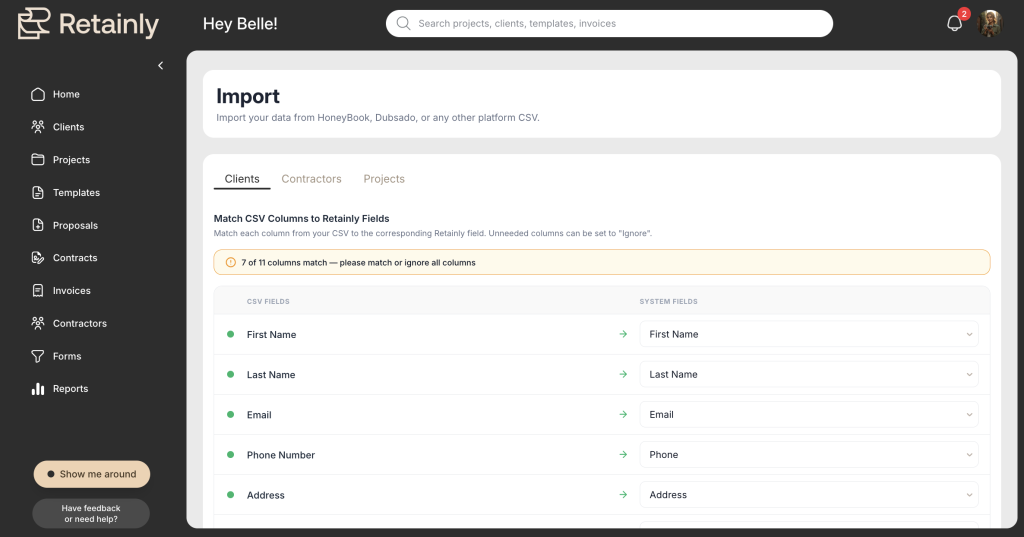
That is really it. A spreadsheet full of names on one side, and an organized client list inside Retainly on the other.
What comes over, and what does not
One thing worth being clear about, because we would rather set the right expectation than surprise you later. CSV Import brings over your records, meaning the core information you already have for your clients, projects, and contractors. Client fields discussed include first name, last name, email, phone, address, city, state, ZIP.
What it does not do is drag your entire old system across with it. The historical paper trail tied to your work, past contracts, signed documents, invoices, payments, and email histories, is not part of the import, and that is on purpose. The import gets your core records in place fast. From there, you build out the workflows that actually matter to you right now.
(But stay tuned, we have a space coming soon where you can drop files to projects, like previously executed contracts or paid invoices!)
You do not have to do it alone
If the idea of moving anything still feels like a lot, you have help. Our team can get your clients brought in and organized so you are not staring at a blank screen wondering where to start. Ask us about our White Glove Onboarding offer! Switching systems does not have to be a solo project. If you would like a hand, just reach out and we will help you get settled.
Switching mid-season? Take it slow
One more thing for anyone making the move in the middle of a busy stretch. You do not have to move your whole business on day one. Bring your client list over, start with the projects you are actively working on, and shift the rest of your workflow when it makes sense for you. A gradual move is a completely valid way to switch.
Ready to bring your clients with you?
- Export your existing client list.
- Upload the CSV.
- Bring your clients into Retainly.
- Start with the active projects you need today.
And if you would rather have help getting set up, reach out for onboarding support. We are happy to walk through it with you!