

Forms Just Got a Big Upgrade
Think about how much of your client information lives in your inbox right now.
The inquiry that came in through your website. The follow-up questions you asked before the session. The wedding day timeline buried in a thread from three weeks ago. The delivery address you asked for twice because you couldn’t find the first answer.
For a lot of creative business owners, “organized client details” really means “a lot of scrolling and searching.” Forms in Retainly are here to fix that, and they just got a lot more powerful.
What’s new
Two things to know right away.
First, you’re no longer limited to a single form. You can now create as many forms as you want. If you offer different services, you can build a form for each one instead of trying to make one form cover everything.
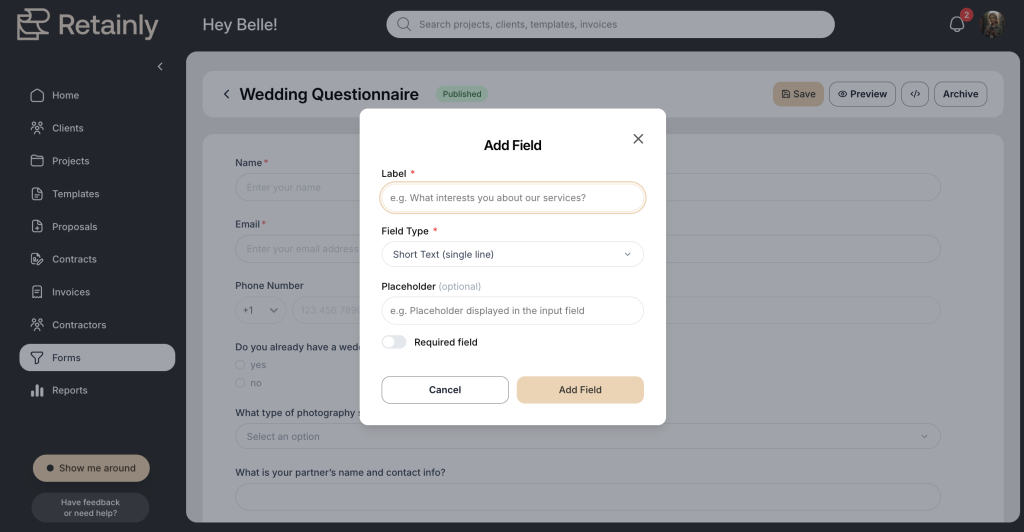
Second, you have more ways to collect answers. Beyond simple text fields, you can now use different response formats, including checkbox questions where a client can pick more than one option, and drop-down lists.
Forms come in two flavors: Lead Forms and Questionnaires. They look similar, but they do very different jobs.
Lead Forms: turn an inquiry into an organized client, automatically
A Lead Form is how someone raises their hand and says “I’m interested.”
You can share it as a direct link or embed it right on your website. When a prospective client fills it out, Retainly automatically creates a client record for them. No copying their name and email from one system into another. No inquiries getting buried in your inbox.
The moment someone submits the form, they’re already in Retainly, ready for you to turn into a project.
And because you can now build more than one, you can get specific. A wedding photographer might embed a wedding inquiry form on their site and use a separate link for portrait sessions. A planner might have one form for full service events and another for day of coordination. Each inquiry lands as its own client record, sorted and ready.
Questionnaires: get the details that make the project happen
Lead Forms are for the very beginning. Questionnaires are for everything after someone’s booked.
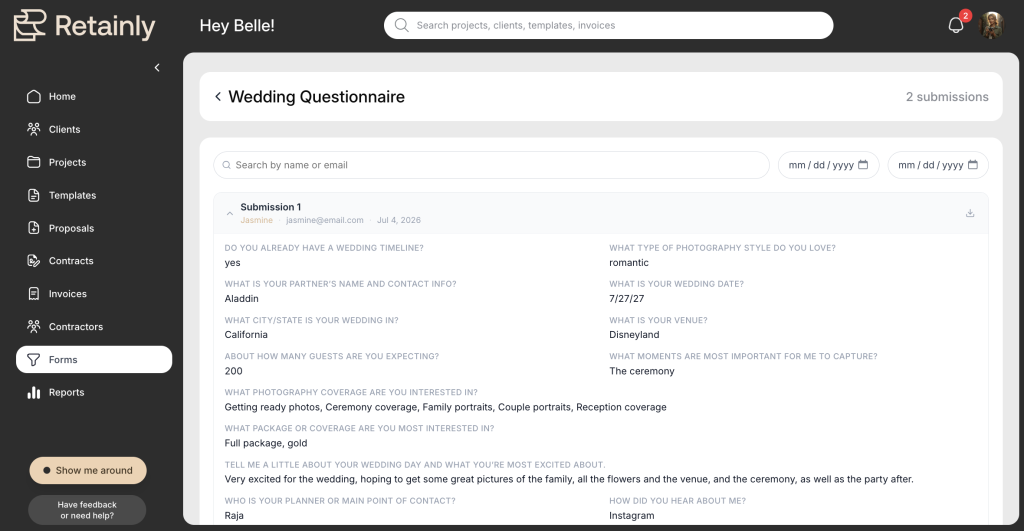
Once a client is in your world, you usually need a lot more from them. The wedding day timeline. The family photo list. The session preferences. The logistics that turn a booking into an actual plan. A Questionnaire lets you ask for all of it in one organized place instead of a dozen back and forth emails.
Here’s the part that matters most: those answers stay connected to the client and their project inside Retainly. You ask once, and the information lives exactly where you need it when the day comes. No digging through email threads the night before a shoot.
You can also pick the format that fits each question instead of forcing everything into a plain text box.
- Dropdown menus for a set list where you want to keep things compact, like package type or session length
- Radio buttons when the client should pick just one option, like “morning or afternoon”
- Checkboxes for “select all that apply” questions, like which add-ons they want
- Text fields (for short and long responses) for the open ended answers you want in their own words
How they work together
Here’s where it clicks. Lead Forms and Questionnaires are two ends of the same story.
A Lead Form asks: “Are you interested in working together?” Retainly creates the client for you.
From there you organize the project, send the proposal, get the contract signed, and handle the invoice.
Then a Questionnaire asks: “Now tell me everything I need to know to serve you well.”
Put it all in a line and you get a clear path:
Inquiry, to client, to project, to booking, to details, to delivery.
That’s the whole point. Instead of stitching together a website form tool, a CRM, a contract system, an invoice tool, and a separate questionnaire platform, the information stays connected from the first hello to the final delivery.
Try it out
If you’ve only ever used a single lead form, this is a good week to go build a few more. Set up a form for each service you offer, then create a questionnaire for the details you always end up chasing. Your inbox will thank you.